Apps · Outages
Outages, told to the right callers.
Declare an outage or planned maintenance once. When an affected customer calls about their service, the AI agent tells them what's happening and when it should be back, instead of troubleshooting. Your team sees every outage, its calls and its tickets in one place.
Telco Ops Bundle.
See it in Crulon.
The same screens as the walkthrough, a step at a time.
Give your agent outage awareness.
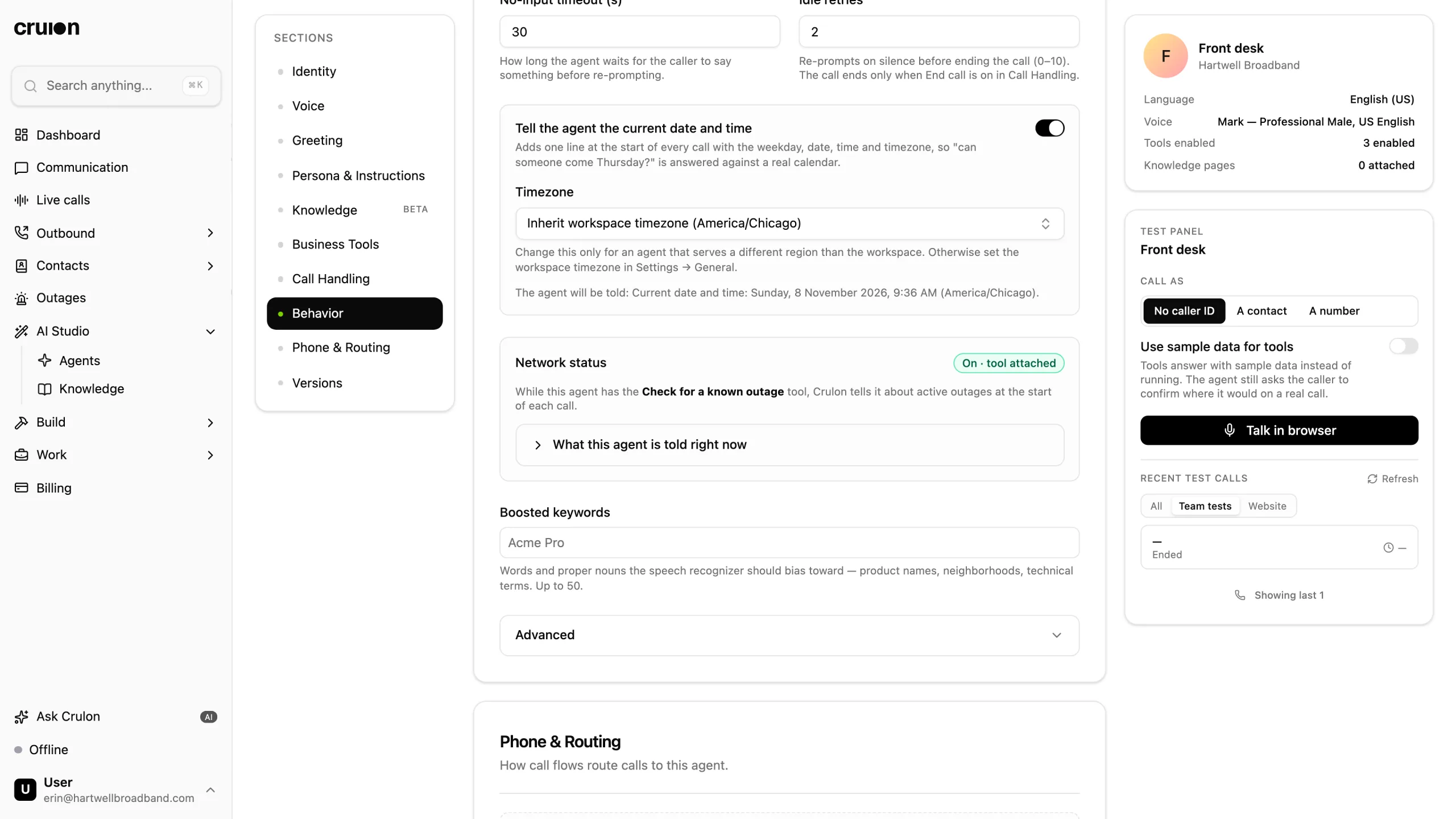
Install Outages from Build › Apps. Then open the agent, attach the Check for a known outage Tool in Business Tools, and publish.
You publish once. Every outage you declare, update or resolve reaches the agent on its next call.
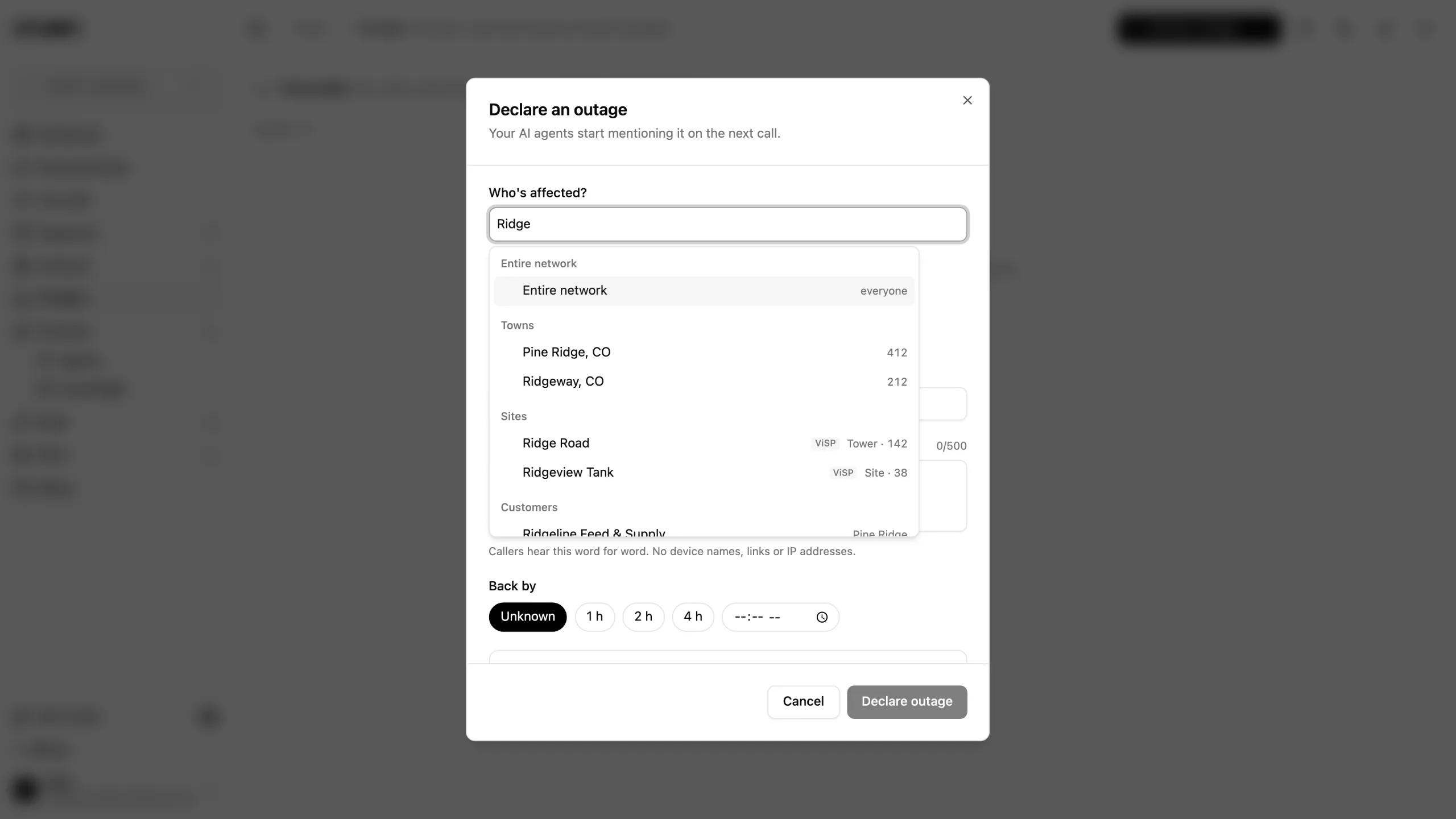
Declare it once.
Pick who's affected: the entire network, a town, a network site, a postal code, a Sonar account group or one customer. Crulon shows roughly how many customers that is.
Choose No service or Slow or intermittent, the message callers hear, and when service should be back, if you know. Agents mention it from the next call.
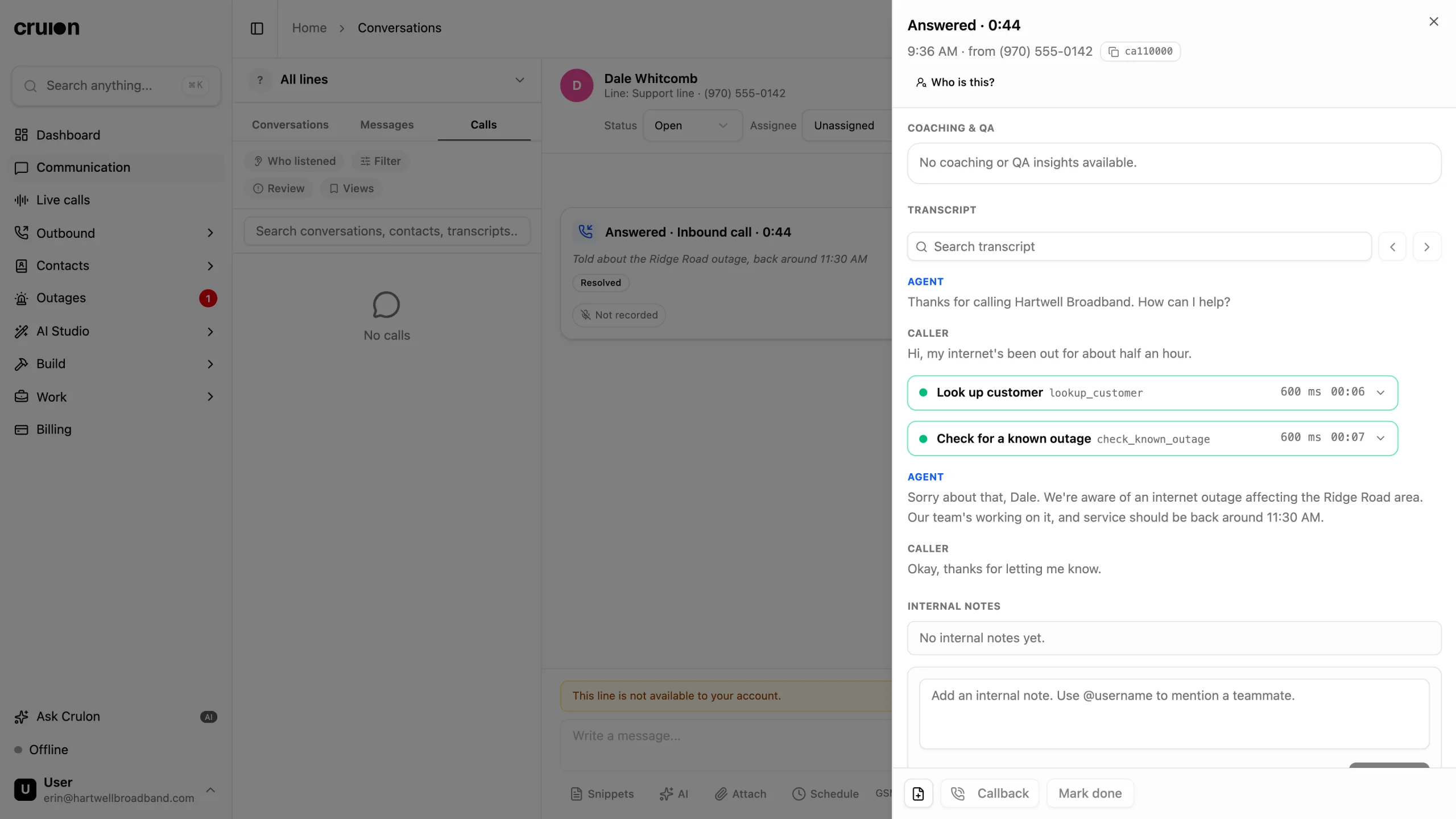
On the call, before any troubleshooting.
When a caller reports a problem, the agent finds them by the number they call from and checks for a known outage first.
If they're affected, it reads your message and your estimate, and doesn't troubleshoot their equipment or open a ticket for it. If they aren't, it carries on as normal. If it can't tell, it names the area and asks.
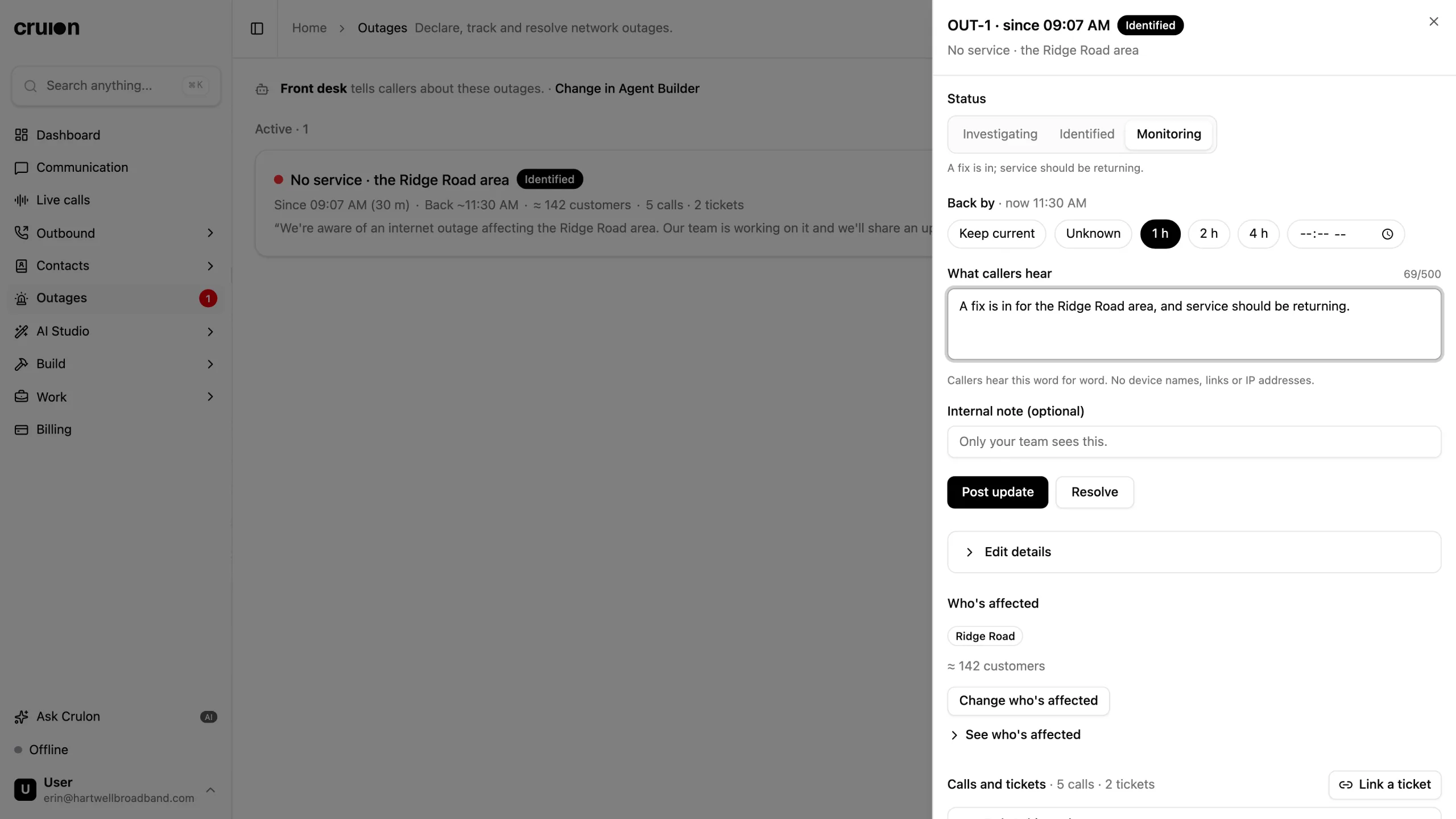
Post updates as the fix goes in.
Move it to Identified or Monitoring, change when service should be back, and rewrite what callers hear. Agents use it from the next call.
At Monitoring, the agent suggests a caller who's still offline restarts their router. Preview what agents are told at any time.
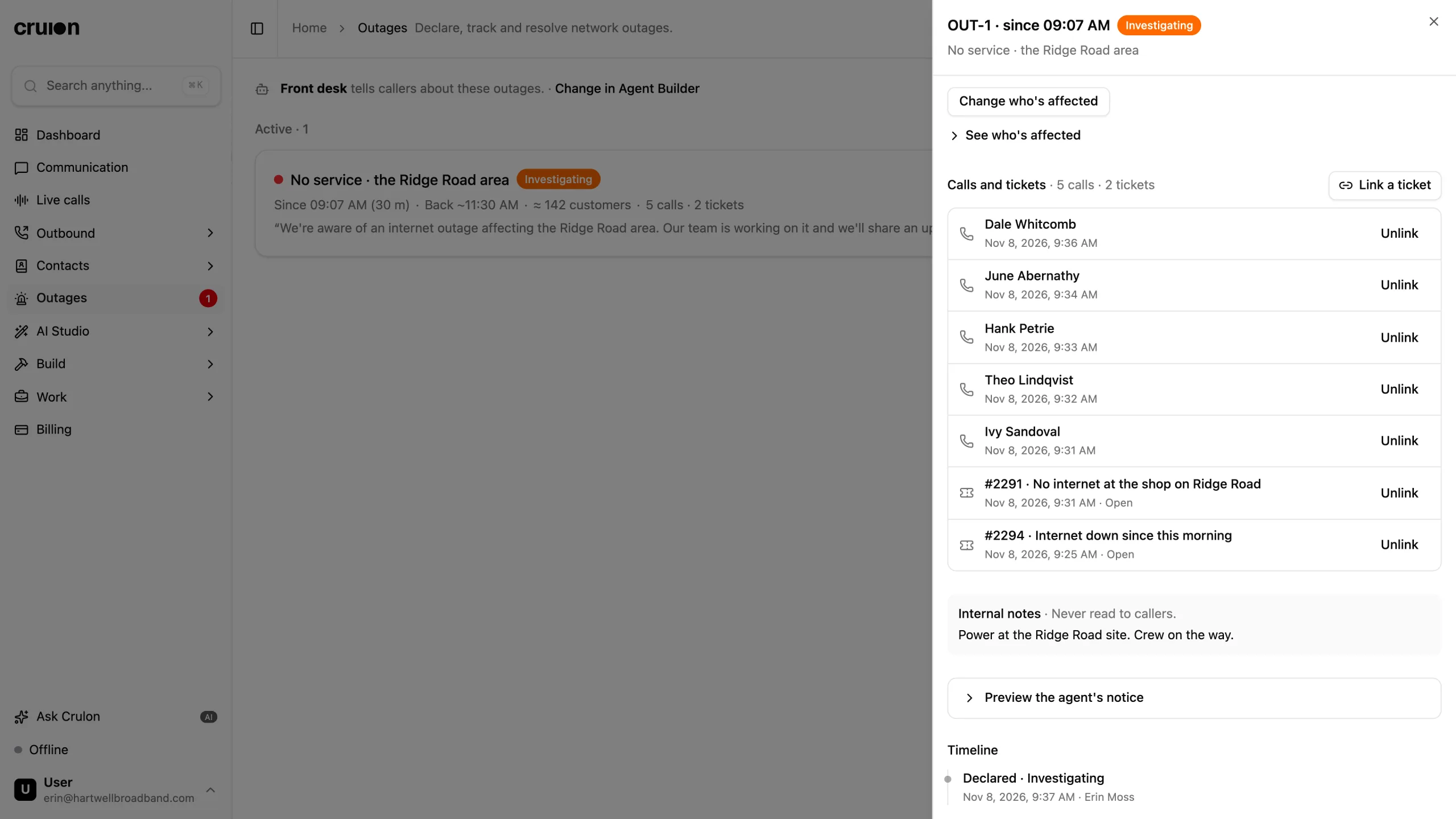
Calls and tickets, in one place.
Calls are linked when the agent tells an affected caller about the outage, and tickets when one is created for an affected customer.
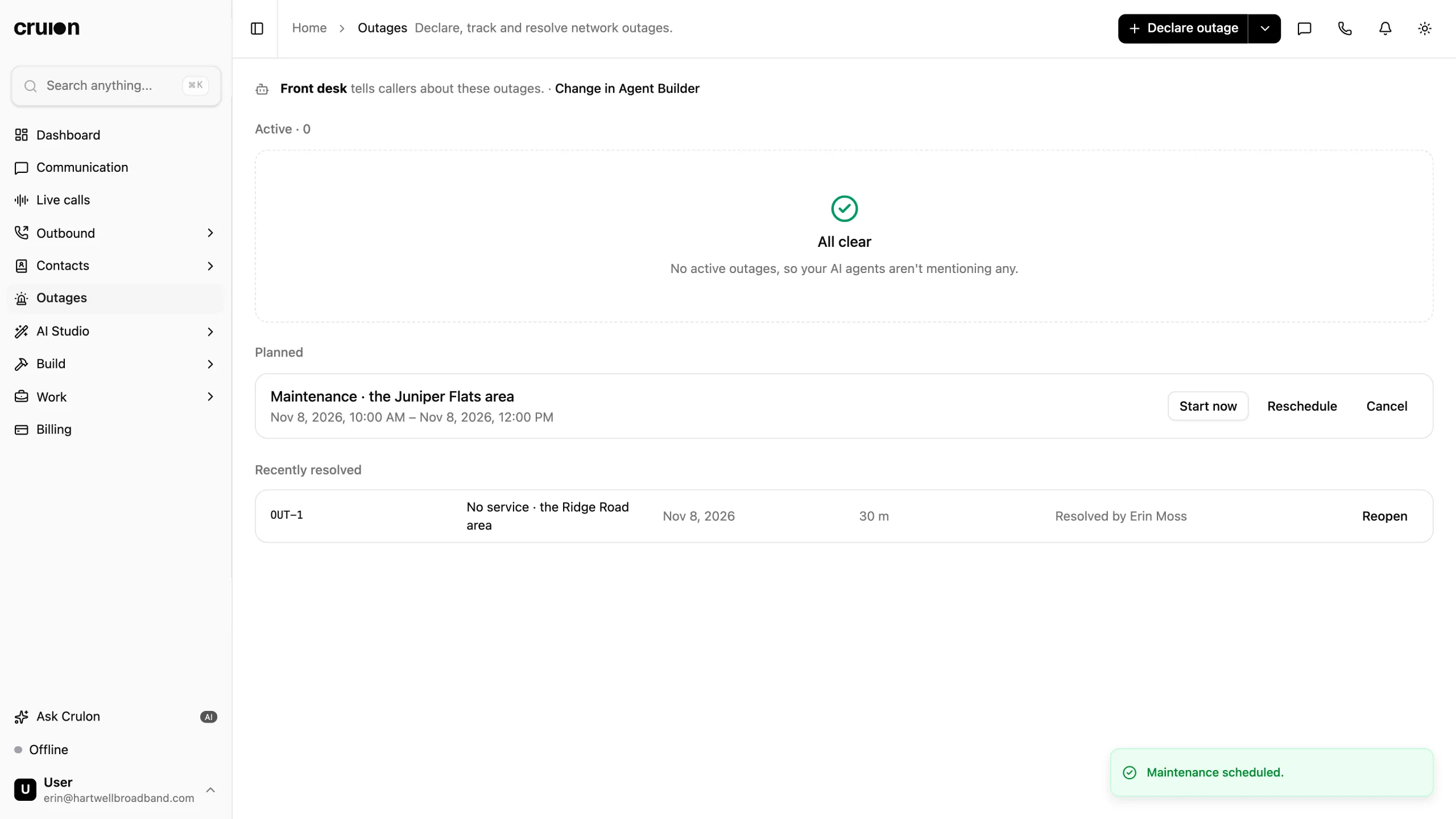
When it's fixed, resolve it and close the linked tickets in the same step, each with a note saying which outage it was.
Planned maintenance, too.
Schedule a window up to 90 days ahead. Until it starts, the agent mentions it only to a caller who asks about planned work.
It starts on time, or when you choose Start now, and callers hear when service should be back. Crulon doesn't finish it for you: resolve it when the work is done.
Matched by what your billing App knows.
You declare outages in Crulon. Your billing App supplies the network sites, account groups and postal codes that callers are matched on.

Billing
Match callers by their Sonar account groups and network sites.
Sonar and Crulon
Billing
Match callers by the Splynx site that serves them. An outage on a site covers the sites beneath it.
Splynx and Crulon
Billing
Match callers by their ViSP site, through their equipment's access point, or by postal code.
ViSP and CrulonAny ISP
With or without one
Pick a town from your contacts, one customer or the entire network. Or describe an area, and the agent asks callers whether they're there.
You stay in charge.
The agent says only what you've declared, to the callers it affects.
It never contacts customers
Crulon doesn't text, email or call anyone about an outage. Callers hear about it when they call.Only when they raise it
The agent mentions an outage only when the caller reports a service problem, and never gives a time you didn't set.You resolve it
Crulon never resolves an outage for you. Within 24 hours, Reopen brings it back.Notes stay with your team
Internal notes are never read to callers. Agents don't see them.Words fit for a caller
Callers hear your message word for word, so Crulon refuses links, IP addresses and email addresses in it.A nudge when it goes quiet
Your team is alerted when an outage is declared or resolved, and reminded when one has gone 6 hours without an update, or the time you set.
One price for the support desk.
Outages comes with the Telecom Connector Pack, with the seven other ISP Apps, in the Telco Ops Bundle.
- Seats
- Up to 5
- AI minutes, pooled
- 1,000
- Telecom Connector Pack
- All eight ISP Apps
- AI overage
- 25¢ a minute
Questions about Outages.
Does Crulon text or email customers about an outage?
No. Crulon never contacts customers about an outage: they hear about it when they call. Your team gets alerts in the notification bell in Crulon.
Do I have to publish the agent after each outage?
No. Attach Check for a known outage to the agent and publish once. Every outage you declare, update or resolve reaches it on its next call.
How does the agent know a caller is affected?
It finds the caller by the number they call from, then checks their town, network site, postal code or Sonar account group against each active outage. If it can't tell, it names the area and asks whether they're there.
Which billing systems does it work with?
Sonar, Splynx and ViSP supply the network sites, account groups and postal codes. Without them, you can still declare an outage for a town on your contacts, one customer, the entire network or a described area.
Can I plan maintenance ahead?
Yes, up to 90 days ahead and up to 72 hours long. Before it starts, the agent mentions it only to a caller who asks about planned work in the next 24 hours. It starts on time, or when you choose Start now, and you resolve it when the work is done.
Which plan is it on?
The Telco Ops Bundle: $499 per workspace a month, with up to five seats, 1,000 pooled AI minutes and all eight ISP Apps, Outages included. It's set up with you after a demo.
Put your next outage on the call.
Book a 30-minute demo and see an outage declared, told to the right callers and resolved, with your own billing App.